 New: AI Music Generator — create songs from lyrics
'%3e%3cg%20id='Group_17091'%20data-name='Group%2017091'%20transform='translate(53%20758)'%3e%3cpath%20id='Path_178899'%20data-name='Path%20178899'%20d='M51.713,62.718h-15.3a.7.7,0,0,1-.584-.328C33.8,59.247,33.65,53.2,33.638,52.3q0-.053,0-.106a.73.73,0,0,1,.705-.75h0a.729.729,0,0,1,.707.747c0,.005,0,.049,0,.128a3.749,3.749,0,1,0,7.489-.125.729.729,0,0,1,.707-.75h1.624a.729.729,0,0,1,.707.75,3.749,3.749,0,1,0,7.489.119c0-.075,0-.117,0-.122a.729.729,0,0,1,.707-.747h0a.73.73,0,0,1,.705.75c0,.036,0,.071,0,.106-.012.9-.167,6.943-2.186,10.086a.7.7,0,0,1-.584.328Zm0,0'%20transform='translate(-32.06%20-49.036)'%20fill='%23fff780'/%3e%3cpath%20id='Path_178900'%20data-name='Path%20178900'%20d='M265.721,51.449h0a.729.729,0,0,0-.707.747c0,.005,0,.047,0,.122a3.749,3.749,0,1,1-7.489-.119.729.729,0,0,0-.707-.75H256v11.27h7.652a.7.7,0,0,0,.584-.327c2.019-3.143,2.174-9.189,2.186-10.086,0-.035,0-.071,0-.106a.73.73,0,0,0-.706-.75Zm0,0'%20transform='translate(-244.004%20-49.037)'%20fill='%23ffc02e'/%3e%3cpath%20id='Path_178901'%20data-name='Path%20178901'%20d='M209.565,0a2.284,2.284,0,1,0,2.284,2.284A2.286,2.286,0,0,0,209.565,0Zm0,0'%20transform='translate(-197.565)'%20fill='%23ffc02e'/%3e%3cpath%20id='Path_178902'%20data-name='Path%20178902'%20d='M256,0V4.567A2.284,2.284,0,0,0,256,0Zm0,0'%20transform='translate(-244.004)'%20fill='%23ffa73b'/%3e%3cpath%20id='Path_178903'%20data-name='Path%20178903'%20d='M2.284,37.6a2.284,2.284,0,1,0,2.284,2.284A2.286,2.286,0,0,0,2.284,37.6Zm0,0'%20transform='translate(0%20-35.836)'%20fill='%23ffc02e'/%3e%3cpath%20id='Path_178904'%20data-name='Path%20178904'%20d='M416.85,37.6a2.284,2.284,0,1,0,2.284,2.284A2.286,2.286,0,0,0,416.85,37.6Zm0,0'%20transform='translate(-395.133%20-35.836)'%20fill='%23ffa73b'/%3e%3cpath%20id='Path_178905'%20data-name='Path%20178905'%20d='M93.683,270.213h-15.3a.707.707,0,0,1-.707-.707V267.4H94.39v2.108A.707.707,0,0,1,93.683,270.213Zm0,0'%20transform='translate(-74.031%20-254.213)'%20fill='%23ffc02e'/%3e%3cpath%20id='Path_178906'%20data-name='Path%20178906'%20d='M256,270.213h7.652a.707.707,0,0,0,.707-.707V267.4H256Zm0,0'%20transform='translate(-244.004%20-254.213)'%20fill='%23ffa73b'/%3e%3c/g%3e%3c/g%3e%3c/svg%3e) Upgrade Now
Upgrade NowI used to spend way too long trying to fix group photos where one person blinked or wasn't looking at the camera. Now I just swap their face from another shot — takes under a minute.
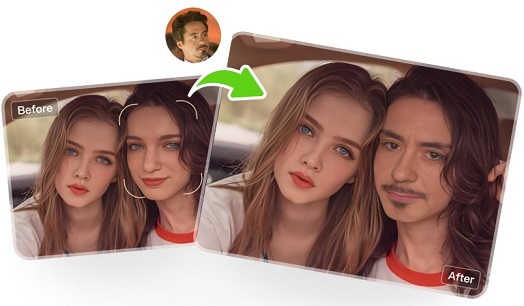
Face swapping with AI is dead simple: you upload a photo, pick a target face, and the AI handles everything else. No Photoshop layers, no manual masking, no tutorials.
How Face Swap AI Works (In Plain English)
AI face swap detects facial features — eyes, nose, mouth, jawline — in two images, then maps one face onto the other. It automatically matches skin tone, lighting, expressions, and edge blending so the result doesn't look pasted on.
The whole thing takes seconds. Here's what the AI handles that used to be manual work:
- Facial alignment and landmark detection
- Skin tone matching across different lighting conditions
- Edge refinement around hair, ears, and jawlines
How to Do a Face Swap: Step by Step
We'll use Vismz's AI Face Swap as an example.
Step 1: Upload Your Original Photo
Pick the image with the face you want to replace. Higher resolution helps, and make sure the face is clearly visible with minimal shadows.Step 2: Upload the Target Face
Choose the face you want to swap in. Front-facing photos work best — the AI needs to see the full facial structure.Step 3: Click Swap
Hit the button. The AI processes both images, aligns the faces, matches lighting and skin tone, and blends the result. You'll see it in seconds.Step 4: Download
Preview the result. If it looks good, download it. If not, try a different target photo — it's free to redo.Tips for Better Results
Match the angle. Face swaps look most natural when both faces are shot from similar angles — two front-facing portraits blend better than a profile and a head-on shot.
Use clear, well-lit photos. AI works with the detail you give it. Blurry or dark images produce worse results.
Avoid extreme lighting mismatches. A face lit from the left swapped onto a face lit from the right will look off. Similar lighting direction helps the AI blend naturally.
What People Use Face Swap For
Beyond fixing group photos, people use face swaps for:
- Putting themselves into famous movie scenes or paintings
- Creating meme templates with a personal twist
- Testing different hairstyles or looks on their own face
- Making personalized reaction GIFs and short videos
- Producing marketing content without hiring models
Getting Started
Face swapping went from "need a pro" to "click a button" in just a few years. If you haven't tried it yet, give it a shot — the first swap takes less time than reading this article.

