 New: AI Music Generator — create songs from lyrics
'%3e%3cg%20id='Group_17091'%20data-name='Group%2017091'%20transform='translate(53%20758)'%3e%3cpath%20id='Path_178899'%20data-name='Path%20178899'%20d='M51.713,62.718h-15.3a.7.7,0,0,1-.584-.328C33.8,59.247,33.65,53.2,33.638,52.3q0-.053,0-.106a.73.73,0,0,1,.705-.75h0a.729.729,0,0,1,.707.747c0,.005,0,.049,0,.128a3.749,3.749,0,1,0,7.489-.125.729.729,0,0,1,.707-.75h1.624a.729.729,0,0,1,.707.75,3.749,3.749,0,1,0,7.489.119c0-.075,0-.117,0-.122a.729.729,0,0,1,.707-.747h0a.73.73,0,0,1,.705.75c0,.036,0,.071,0,.106-.012.9-.167,6.943-2.186,10.086a.7.7,0,0,1-.584.328Zm0,0'%20transform='translate(-32.06%20-49.036)'%20fill='%23fff780'/%3e%3cpath%20id='Path_178900'%20data-name='Path%20178900'%20d='M265.721,51.449h0a.729.729,0,0,0-.707.747c0,.005,0,.047,0,.122a3.749,3.749,0,1,1-7.489-.119.729.729,0,0,0-.707-.75H256v11.27h7.652a.7.7,0,0,0,.584-.327c2.019-3.143,2.174-9.189,2.186-10.086,0-.035,0-.071,0-.106a.73.73,0,0,0-.706-.75Zm0,0'%20transform='translate(-244.004%20-49.037)'%20fill='%23ffc02e'/%3e%3cpath%20id='Path_178901'%20data-name='Path%20178901'%20d='M209.565,0a2.284,2.284,0,1,0,2.284,2.284A2.286,2.286,0,0,0,209.565,0Zm0,0'%20transform='translate(-197.565)'%20fill='%23ffc02e'/%3e%3cpath%20id='Path_178902'%20data-name='Path%20178902'%20d='M256,0V4.567A2.284,2.284,0,0,0,256,0Zm0,0'%20transform='translate(-244.004)'%20fill='%23ffa73b'/%3e%3cpath%20id='Path_178903'%20data-name='Path%20178903'%20d='M2.284,37.6a2.284,2.284,0,1,0,2.284,2.284A2.286,2.286,0,0,0,2.284,37.6Zm0,0'%20transform='translate(0%20-35.836)'%20fill='%23ffc02e'/%3e%3cpath%20id='Path_178904'%20data-name='Path%20178904'%20d='M416.85,37.6a2.284,2.284,0,1,0,2.284,2.284A2.286,2.286,0,0,0,416.85,37.6Zm0,0'%20transform='translate(-395.133%20-35.836)'%20fill='%23ffa73b'/%3e%3cpath%20id='Path_178905'%20data-name='Path%20178905'%20d='M93.683,270.213h-15.3a.707.707,0,0,1-.707-.707V267.4H94.39v2.108A.707.707,0,0,1,93.683,270.213Zm0,0'%20transform='translate(-74.031%20-254.213)'%20fill='%23ffc02e'/%3e%3cpath%20id='Path_178906'%20data-name='Path%20178906'%20d='M256,270.213h7.652a.707.707,0,0,0,.707-.707V267.4H256Zm0,0'%20transform='translate(-244.004%20-254.213)'%20fill='%23ffa73b'/%3e%3c/g%3e%3c/g%3e%3c/svg%3e) Upgrade Now
Upgrade NowProduct photos sell products. A clean white-background shot consistently outperforms a cluttered real-world photo on Amazon, Shopify, and eBay. But hiring a photographer or manually editing dozens of SKUs adds up fast.
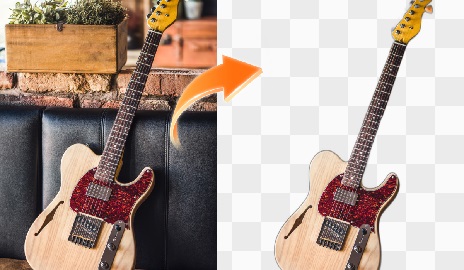
With Vismz AI Background Remover, you can turn any product photo into a studio-quality image in seconds — no photographer, no Photoshop, no per-image cost.
Why Backgrounds Matter for Sales
Customers see the image before they read the title or price. A clean background:
- Puts full focus on the product (not your kitchen counter)
- Makes listings look professional and trustworthy
- Meets marketplace requirements (Amazon requires pure white backgrounds for main images)
- Keeps your brand looking consistent across all products
Manual Editing vs AI: The Real Numbers
Manual route: Open Photoshop → pen tool to trace product → refine edges → export → repeat for each SKU. A fast editor might do 10-15 products per hour. At scale, you're either burning your own time or paying someone else's.
AI route: Upload → click → download. 5-10 seconds per product. You can process an entire catalog in the time it used to take to edit one photo.
How to Process Product Photos with Vismz
Step 1: Upload
Drag your product photo in. Works directly from your phone, camera, or existing catalog.Step 2: AI Removes the Background
Vismz detects the product and strips the background automatically. No manual selection needed.Step 3: Download Clean Image
Export as PNG with transparent background, or add a solid white/colored background for marketplace requirements.Platform-Specific Tips
Amazon: Main images require pure white background (RGB 255,255,255). Export as JPEG with white fill. Minimum 1000px on the longest side — 2000px+ recommended for zoom.
Shopify: Transparent PNGs give you the most flexibility. You can place products on any themed background in your store design.
eBay / Etsy / Poshmark: Clean white backgrounds make your listings stand out in search results. Ebay's own research shows white-background photos get more clicks.
Dropshipping: When you're listing products from suppliers, their photos are often cluttered or branded. Strip the background and present a clean, consistent look across your store.
Does It Work for All Products?
Best results come from products with clear edges and decent contrast against their background. Jewelry, clothing, electronics, cosmetics, food — all work well. Products photographed on plain backgrounds get the cleanest cut. Highly reflective surfaces (mirrors, shiny metal) may need a second pass.
Ready to Process Your Catalog?
Try Vismz AI Background Remover — upload your first product photo and see the result instantly. Free to preview, no sign-up required.

