 New: AI Music Generator — create songs from lyrics
'%3e%3cg%20id='Group_17091'%20data-name='Group%2017091'%20transform='translate(53%20758)'%3e%3cpath%20id='Path_178899'%20data-name='Path%20178899'%20d='M51.713,62.718h-15.3a.7.7,0,0,1-.584-.328C33.8,59.247,33.65,53.2,33.638,52.3q0-.053,0-.106a.73.73,0,0,1,.705-.75h0a.729.729,0,0,1,.707.747c0,.005,0,.049,0,.128a3.749,3.749,0,1,0,7.489-.125.729.729,0,0,1,.707-.75h1.624a.729.729,0,0,1,.707.75,3.749,3.749,0,1,0,7.489.119c0-.075,0-.117,0-.122a.729.729,0,0,1,.707-.747h0a.73.73,0,0,1,.705.75c0,.036,0,.071,0,.106-.012.9-.167,6.943-2.186,10.086a.7.7,0,0,1-.584.328Zm0,0'%20transform='translate(-32.06%20-49.036)'%20fill='%23fff780'/%3e%3cpath%20id='Path_178900'%20data-name='Path%20178900'%20d='M265.721,51.449h0a.729.729,0,0,0-.707.747c0,.005,0,.047,0,.122a3.749,3.749,0,1,1-7.489-.119.729.729,0,0,0-.707-.75H256v11.27h7.652a.7.7,0,0,0,.584-.327c2.019-3.143,2.174-9.189,2.186-10.086,0-.035,0-.071,0-.106a.73.73,0,0,0-.706-.75Zm0,0'%20transform='translate(-244.004%20-49.037)'%20fill='%23ffc02e'/%3e%3cpath%20id='Path_178901'%20data-name='Path%20178901'%20d='M209.565,0a2.284,2.284,0,1,0,2.284,2.284A2.286,2.286,0,0,0,209.565,0Zm0,0'%20transform='translate(-197.565)'%20fill='%23ffc02e'/%3e%3cpath%20id='Path_178902'%20data-name='Path%20178902'%20d='M256,0V4.567A2.284,2.284,0,0,0,256,0Zm0,0'%20transform='translate(-244.004)'%20fill='%23ffa73b'/%3e%3cpath%20id='Path_178903'%20data-name='Path%20178903'%20d='M2.284,37.6a2.284,2.284,0,1,0,2.284,2.284A2.286,2.286,0,0,0,2.284,37.6Zm0,0'%20transform='translate(0%20-35.836)'%20fill='%23ffc02e'/%3e%3cpath%20id='Path_178904'%20data-name='Path%20178904'%20d='M416.85,37.6a2.284,2.284,0,1,0,2.284,2.284A2.286,2.286,0,0,0,416.85,37.6Zm0,0'%20transform='translate(-395.133%20-35.836)'%20fill='%23ffa73b'/%3e%3cpath%20id='Path_178905'%20data-name='Path%20178905'%20d='M93.683,270.213h-15.3a.707.707,0,0,1-.707-.707V267.4H94.39v2.108A.707.707,0,0,1,93.683,270.213Zm0,0'%20transform='translate(-74.031%20-254.213)'%20fill='%23ffc02e'/%3e%3cpath%20id='Path_178906'%20data-name='Path%20178906'%20d='M256,270.213h7.652a.707.707,0,0,0,.707-.707V267.4H256Zm0,0'%20transform='translate(-244.004%20-254.213)'%20fill='%23ffa73b'/%3e%3c/g%3e%3c/g%3e%3c/svg%3e) Upgrade Now
Upgrade NowI sell vintage cameras on eBay as a side thing. Nothing serious — just stuff I find at estate sales and clean up. The single thing that improved my sales the most wasn't better pricing or better descriptions. It was putting every product on a clean white background instead of my kitchen table.
The problem is that manually removing backgrounds from 20 product photos takes forever. I used to spend Sunday afternoons in Photoshop with the pen tool, tracing edges around camera straps and lens barrels, trying not to lose the fine details. Each photo took 10-15 minutes.
Then I tried an AI background remover. It processes a photo in about 3 seconds — and honestly? It handles hair and fine edges better than I do.
Vismz AI Background Remover — no sign-up, no install, upload and go.
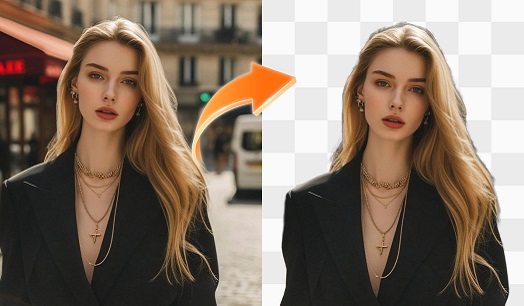
How the AI Actually Handles Edges
The thing that always made manual background removal painful was edge refinement. Hair. Fur. Transparent objects. The places where the foreground and background blur together and you can't just draw a clean line.
The AI handles this surprisingly well because it's not just looking at color boundaries — it's analyzing the image as a whole and figuring out what's subject and what's background. For hair, it preserves individual strands rather than giving you a helmet-head cutout. For my cameras, it keeps the strap details and the gaps between parts, which was the thing I always struggled with manually.
It's not magic — if your subject is wearing the same color as the background, or if the lighting is extremely flat, the AI has to guess and sometimes guesses wrong. But for probably 90% of photos you'd actually want to remove a background from, it works first try.
Three Steps, No Tutorial Needed
Upload your image. Wait a few seconds. Download a transparent PNG.
That's genuinely it. There's a video background remover too, which surprised me — I'd only seen image-based tools before. It processes video frames the same way, extracting the subject across the timeline.
What I Use It For
Product photos, obviously. But I've also used it for: making sticker-style cutouts for Instagram Stories, isolating my face from group photos for profile pictures, and once, extracting a cool mural I saw on vacation to use as a print design element.
If you run an online store — Etsy, Shopify, Amazon, whatever — this is probably the single highest-ROI AI tool you'll use. Clean product photos consistently outperform cluttered real-world shots in A/B testing, and you can process your entire catalog in minutes instead of hiring a photo editor or spending your weekends with the pen tool.
A Few Things I Learned
Start with photos where your subject clearly contrasts with the background. A white shirt against a white wall is asking for trouble. Natural light with the subject lit differently from the background produces the cleanest cut.
Avoid heavy motion blur in your images. The AI needs clear edges to work with. A slightly blurry product shot will produce a slightly blurry cutout.
For video backgrounds: shorter clips process faster, and the AI does better when the subject stays in frame consistently. If your subject keeps moving in and out of frame, the output gets choppy.
Should You Try It?
Open Vismz AI Background Remover, use it on one photo, and compare the result to doing it manually. If you're anything like me, you'll never go back.

