 New: AI Music Generator — create songs from lyrics
'%3e%3cg%20id='Group_17091'%20data-name='Group%2017091'%20transform='translate(53%20758)'%3e%3cpath%20id='Path_178899'%20data-name='Path%20178899'%20d='M51.713,62.718h-15.3a.7.7,0,0,1-.584-.328C33.8,59.247,33.65,53.2,33.638,52.3q0-.053,0-.106a.73.73,0,0,1,.705-.75h0a.729.729,0,0,1,.707.747c0,.005,0,.049,0,.128a3.749,3.749,0,1,0,7.489-.125.729.729,0,0,1,.707-.75h1.624a.729.729,0,0,1,.707.75,3.749,3.749,0,1,0,7.489.119c0-.075,0-.117,0-.122a.729.729,0,0,1,.707-.747h0a.73.73,0,0,1,.705.75c0,.036,0,.071,0,.106-.012.9-.167,6.943-2.186,10.086a.7.7,0,0,1-.584.328Zm0,0'%20transform='translate(-32.06%20-49.036)'%20fill='%23fff780'/%3e%3cpath%20id='Path_178900'%20data-name='Path%20178900'%20d='M265.721,51.449h0a.729.729,0,0,0-.707.747c0,.005,0,.047,0,.122a3.749,3.749,0,1,1-7.489-.119.729.729,0,0,0-.707-.75H256v11.27h7.652a.7.7,0,0,0,.584-.327c2.019-3.143,2.174-9.189,2.186-10.086,0-.035,0-.071,0-.106a.73.73,0,0,0-.706-.75Zm0,0'%20transform='translate(-244.004%20-49.037)'%20fill='%23ffc02e'/%3e%3cpath%20id='Path_178901'%20data-name='Path%20178901'%20d='M209.565,0a2.284,2.284,0,1,0,2.284,2.284A2.286,2.286,0,0,0,209.565,0Zm0,0'%20transform='translate(-197.565)'%20fill='%23ffc02e'/%3e%3cpath%20id='Path_178902'%20data-name='Path%20178902'%20d='M256,0V4.567A2.284,2.284,0,0,0,256,0Zm0,0'%20transform='translate(-244.004)'%20fill='%23ffa73b'/%3e%3cpath%20id='Path_178903'%20data-name='Path%20178903'%20d='M2.284,37.6a2.284,2.284,0,1,0,2.284,2.284A2.286,2.286,0,0,0,2.284,37.6Zm0,0'%20transform='translate(0%20-35.836)'%20fill='%23ffc02e'/%3e%3cpath%20id='Path_178904'%20data-name='Path%20178904'%20d='M416.85,37.6a2.284,2.284,0,1,0,2.284,2.284A2.286,2.286,0,0,0,416.85,37.6Zm0,0'%20transform='translate(-395.133%20-35.836)'%20fill='%23ffa73b'/%3e%3cpath%20id='Path_178905'%20data-name='Path%20178905'%20d='M93.683,270.213h-15.3a.707.707,0,0,1-.707-.707V267.4H94.39v2.108A.707.707,0,0,1,93.683,270.213Zm0,0'%20transform='translate(-74.031%20-254.213)'%20fill='%23ffc02e'/%3e%3cpath%20id='Path_178906'%20data-name='Path%20178906'%20d='M256,270.213h7.652a.707.707,0,0,0,.707-.707V267.4H256Zm0,0'%20transform='translate(-244.004%20-254.213)'%20fill='%23ffa73b'/%3e%3c/g%3e%3c/g%3e%3c/svg%3e) Upgrade Now
Upgrade NowHow to Translate YouTube Videos into Multiple Languages
A video that only works in one language is leaving views on the table. YouTube's own data shows that over 60% of a channel's views can come from outside the creator's home country.
AI video translation lets you take one video and publish it in 5, 10, or 20 languages — each with its own voiceover and subtitles.
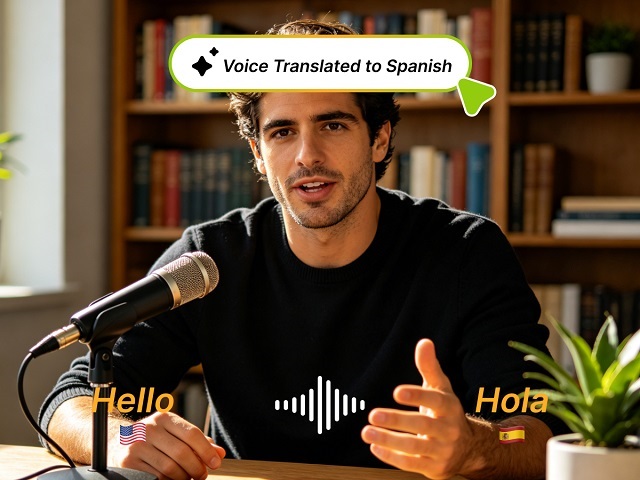
Why Multi-Language YouTube Channels Win
- Larger audience. A creator making English-only content reaches ~1.5 billion English speakers. Adding Spanish, Hindi, and Portuguese opens up another 2+ billion potential viewers.
- Less competition. Non-English YouTube markets are far less saturated. A video in German or Japanese faces a fraction of the competition of the same topic in English.
- YouTube's algorithm favors it. Multi-language channels get more total watch time, which signals to YouTube that the content is valuable.
How to Translate a YouTube Video with AI
Step 1: Download Your Original Video
Export your finished video from your editor. Keep the original high-quality file — compression hurts translation accuracy.Step 2: Upload to Vismz
Open Vismz AI Video Translator and upload your video file.Step 3: Set Source and Target Languages
Tell Vismz what language your video is in, then pick your target languages. Vismz supports 100+ languages including Spanish, Hindi, Portuguese, Mandarin, Japanese, Korean, German, French, and Arabic.Step 4: Generate
AI transcribes your video → translates the script → generates AI voiceover → creates timed subtitles. Processing takes a few minutes for a typical 10-minute video.Step 5: Upload to YouTube
For each language version:- Upload the translated video as a new YouTube video
- Set the title and description in the target language (translate these too — don't leave English titles on a Spanish video)
- Upload the auto-generated subtitle file that Vismz provides
- Add the video to a language-specific playlist
Tips for Better Results
Clean audio matters. The AI transcribes from your original audio. Clear speech with minimal background noise gets the most accurate transcription and translation.
Keep it conversational. Highly technical jargon or rapid-fire speech can trip up AI transcription. Natural pacing helps.
Review key terms. If your video uses brand names or specialized vocabulary, check that they translated correctly. AI handles everyday language well but can stumble on niche terms.
Translate titles and descriptions too. YouTube's search algorithm works in the user's language. A Spanish title will rank for Spanish searches; an English title won't.
One Video, Global Reach
The economics of AI translation completely change what's possible. A creator who used to publish in one language can now publish in ten — for roughly the same effort. The first video you translate might find an audience you didn't know you had.
Try Vismz AI Video Translator — upload a video and translate it into 100+ languages with AI voiceover and subtitles.

